✨ New Arrivals Just Dropped!Explore

AutoEnginuity PC Mongoose Scantool with 03-23 Ford Expansion
"Always have the right tool for the job." Ever heard that old saying? When you're trying to diagnose an issue with your Powerstroke, sure, you can spend time rifling through the internet, visually inspecting wiring, tapping sensors, and generally frustrating yourself, or you can get yourself a proper scan tool that will read codes, check sensors, deliver test results, and get the job done in half the time so you can move on with your day. And that's what the AutoEnginuity Scantool is all about. Coverage, coverage, coverage. With AutoEnginuity's Giotto ScanTool, you'll have access to ABS, airbag, enhanced powertrain, instrument cluster, transmission, and dozens of other body and chassis controllers. The depth of coverage consists of live data, bi-directional controls, adaptive resets and learns, system tests, and trouble code retrieval and clearing.
AutoEnginuity pioneered the art of powerful user-interfaces while never sacrificing the ease-of-use. Their industry-leading graphing can pan, zoom, and display several plots on the same graph with a single click; more advanced graphing features includes tagging plot locations for quick identification and printing the graph.
IMPORTANT NOTE: F450/F550/F650/F750 are not light-duty trucks and will have limited or no support.
POWERFUL FEATURES INCLUDE:
- Print DTC and IM/Mode 6 data in a customizable report format. Use those reports to walk customers through necessary repairs and upsell optional repairs.
- Translated and scaled Mode 6 data. View data in a useable form instead of raw data.
- Data logging in two different formats (Whether you logged in XML or CSV, you have the ability to playback and view your logs offline):
- XML for browsers
- CSV for spread sheets.
- Configurable Sensor data. Each individual sensor's sampling rate, ranges, alertable audio trigger points, units, and scaling value can be set to your specific needs.
EASE OF USE
Today, everybody understands the power of personal computers and their versatile interface. Why not leverage the technology already at your fingertips for your scan tool? The familiar Windows interface provides access to systems and sensors more intuitively and more quickly than traditional handhelds. Want to add all of the sensors for a system? Simply navigate to the live data screen and click the column header for sensors. It’s that easy. Complex tools do not require complex user-interfaces.
Today, everybody understands the power of personal computers and their versatile interface. Why not leverage the technology already at your fingertips for your scan tool? The familiar Windows interface provides access to systems and sensors more intuitively and more quickly than traditional handhelds. Want to add all of the sensors for a system? Simply navigate to the live data screen and click the column header for sensors. It’s that easy. Complex tools do not require complex user-interfaces.
AutoEnginuity's user-interface was designed around the theory of Power through Simplicity. For every step that you have to repeat, AE tried to streamline and automate it. For example, ScanTool can help you with:
- Automated VIN decoding
- Reading and Clearing Trouble Codes from the entire vehicle in a single step
- Printing live data or DTC / Emissions reports with a single step
- Quick installation with true USB Plug and Play (no device drivers necessary)
Lastly, ease-of-use also extends to the software being customizable. You can arrange the user-interface to suit you and even your computing device. Even if you purchase a new high-resolution laptop, you can set the software to use the higher-resolution user-interface. Efficiency with your tool translates into more vehicles you can repair.
MODULAR AND UPDATABLE
With AE's Coverage On Demand feature, you can buy the coverage in bundles or à la carte. It’s totally up you, and your needs. For example, if your customer brings a Jaguar in and you have the AutoEnginuity Asian bundle, you can simply call in and upgrade your current system. You can then bill your customer for the diagnostic time and proceed with the repair. Now you can save money instead of farming the work out; and, in some cases, save time not shipping the vehicle out.
The automotive industry is fast moving and ever changing. With AutoEnginuity's Giotto™ ScanTool you can stay on top of the latest coverage you need. This ScanTool is updated frequently through the Internet. The base ScanTool software updates are free.
THE ADVANTAGES ARE COMPELLING
It's important to have the right tools for the job. Don't waste your time with tools that lack the coverage you need. With AutoEnginuity's Giotto ScanTool you will have a powerful full-featured diagnostic tool that can grow with you and your needs. Buy the one tool that will help you diagnose all of your ‘96 and later vehicle’s needs.
WHAT IT CAN DO:
- Vehicle-Information-Dialog:
- Read and clear Freeze Frame data
- DTC-Report-Sample:
- Clear the Check Engine or Service Engine Soon indicator
- View live vehicle sensors in a meter, graph, and grid format
- Live Data MeterLive Data Meter
- Live Data GridLive Data Grid
- Live Data GraphsLive Data Graphs:
- View oxygen sensor live data and test results
- O2 Sensor Dialog:
- View all 11 Inspection/Maintenance systems and Mode 6 data
- Vehicle information Dialog:
- Unlimited logging of live vehicle sensors in XML or CSV (1ms logging accuracy)
- Playback your data logs for offline analysis
- Run and query specific component and system tests. Support for generic and enhanced bi-directional tests
- Test Onboard Ford Tests: Configure your sensors' ranges, scaling value, audible alert triggers, units, and sampling rate
- Sensor Configuration Dialog:
- Read the ECM ID, calibration, and calibration verification IDs from all reporting ECMs
- Onboard Test Results Dialog:
- View generic and manufacturer enhanced data on the same tool
- Configure the interface to suit your preferences
- Supports: 1996 and newer passenger vehicles whether it be domestic, Asian, or European.
- SAE interfaces: J1850 (PWM and VPM), ISO-9141-2, ISO-14230 [KWP2000], and CAN [11Bit and 29Bit]
REQUIREMENTS:
- Windows 7 / 8.0 / 8.1 / 10 / 11 operating system
- 400 MB of free drive space
- 100 MB of memory
- 1 USB Port (USB 2.0 support is required for operation. USB 2.0 is built-into Windows® XP (not supported) and later)
SYSTEM TESTS:
- PATS Timed Key Programming ('96 - '08)
- KOEO
- KOER
- Power Balance (CAN-based models)
- EVAP Bay Test
- Service Bleed (Non-CAN support not available with ProLine currently)
- Buzz Injector
- Cylinder Contribution Test
- Switch Test
- Glow Plug Test
- System Self-Test
- Low - and High Speed Fan
- All Outputs On/Off
- Injector Coding (1.8L and 2.0L)
- KAM Reset
- Misfire Monitor Neutral Profile Correction
- Tire Size Programming up to 40" (2003-2007 6.0L trucks)
- IVD Initialization
- Steering Angle / Yaw Rate / Acceleration Sensor Reset ('03 Explorer and Lincoln LS)
- Passenger Seat ReZero and Passenger Weight Reset
- Power Seat Calibration Test
- Audio Network Communication Test
- Vehicle In-Motion IO Test
- Front Wiper Self-Test
- Rear Wiper Self-Test
- Diesel Particulate Filter Reset, Clear EGR Adaptive Tables, and Clear Fuel Injector Adaptive Tables
- DPF Regeneration, SCR Dosing Measurement Test, SCR Visual Leak Test
- BMS Reset
- TPMS Sensor Training Mode
- Crash Reset Status (Transit '15+)
- Electronic Parking Brake Maintenance Mode (Fusion HEV '14+)
- And much more!
Product Information
Product Information
Shipping & Returns
Shipping & Returns
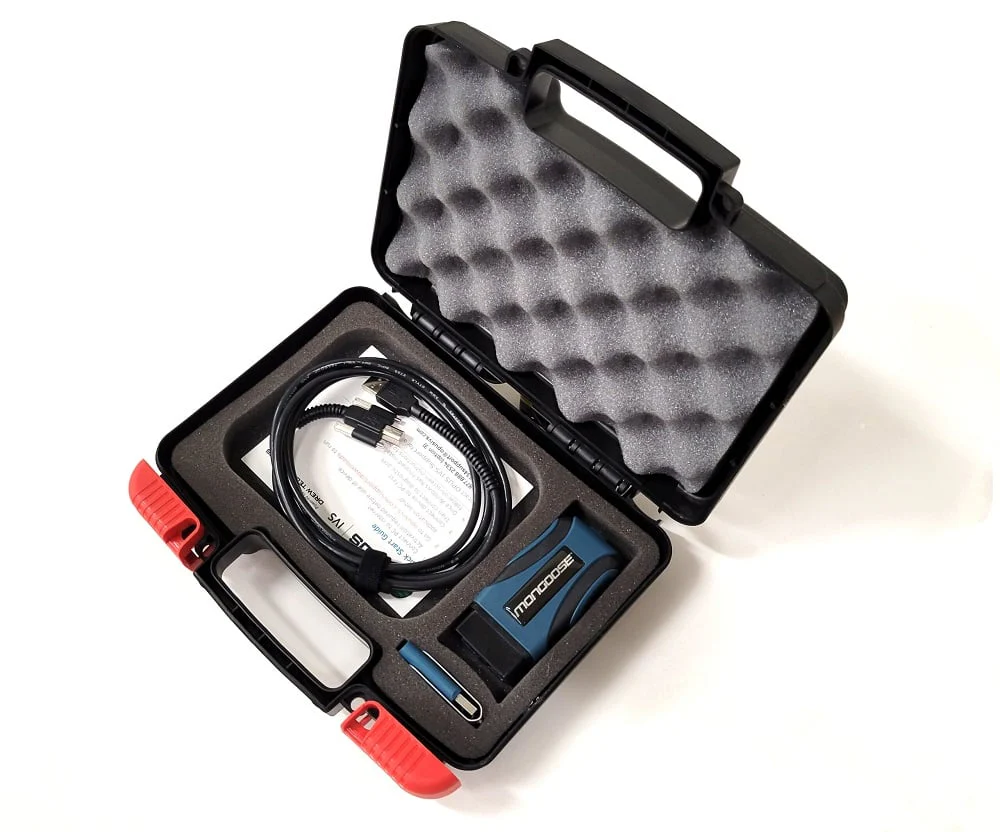
AutoEnginuity PC Mongoose Scantool with 03-23 Ford Expansion
AutoEnginuity PC Mongoose Scantool with 03-23 Ford Expansion
"Always have the right tool for the job." Ever heard that old saying? When you're trying to diagnose an issue with your Powerstroke, sure, you can spend time rifling through the internet, visually inspecting wiring, tapping sensors, and generally frustrating yourself, or you can get yourself a proper scan tool that will read codes, check sensors, deliver test results, and get the job done in half the time so you can move on with your day. And that's what the AutoEnginuity Scantool is all about. Coverage, coverage, coverage. With AutoEnginuity's Giotto ScanTool, you'll have access to ABS, airbag, enhanced powertrain, instrument cluster, transmission, and dozens of other body and chassis controllers. The depth of coverage consists of live data, bi-directional controls, adaptive resets and learns, system tests, and trouble code retrieval and clearing.
AutoEnginuity pioneered the art of powerful user-interfaces while never sacrificing the ease-of-use. Their industry-leading graphing can pan, zoom, and display several plots on the same graph with a single click; more advanced graphing features includes tagging plot locations for quick identification and printing the graph.
IMPORTANT NOTE: F450/F550/F650/F750 are not light-duty trucks and will have limited or no support.
POWERFUL FEATURES INCLUDE:
- Print DTC and IM/Mode 6 data in a customizable report format. Use those reports to walk customers through necessary repairs and upsell optional repairs.
- Translated and scaled Mode 6 data. View data in a useable form instead of raw data.
- Data logging in two different formats (Whether you logged in XML or CSV, you have the ability to playback and view your logs offline):
- XML for browsers
- CSV for spread sheets.
- Configurable Sensor data. Each individual sensor's sampling rate, ranges, alertable audio trigger points, units, and scaling value can be set to your specific needs.
EASE OF USE
Today, everybody understands the power of personal computers and their versatile interface. Why not leverage the technology already at your fingertips for your scan tool? The familiar Windows interface provides access to systems and sensors more intuitively and more quickly than traditional handhelds. Want to add all of the sensors for a system? Simply navigate to the live data screen and click the column header for sensors. It’s that easy. Complex tools do not require complex user-interfaces.
Today, everybody understands the power of personal computers and their versatile interface. Why not leverage the technology already at your fingertips for your scan tool? The familiar Windows interface provides access to systems and sensors more intuitively and more quickly than traditional handhelds. Want to add all of the sensors for a system? Simply navigate to the live data screen and click the column header for sensors. It’s that easy. Complex tools do not require complex user-interfaces.
AutoEnginuity's user-interface was designed around the theory of Power through Simplicity. For every step that you have to repeat, AE tried to streamline and automate it. For example, ScanTool can help you with:
- Automated VIN decoding
- Reading and Clearing Trouble Codes from the entire vehicle in a single step
- Printing live data or DTC / Emissions reports with a single step
- Quick installation with true USB Plug and Play (no device drivers necessary)
Lastly, ease-of-use also extends to the software being customizable. You can arrange the user-interface to suit you and even your computing device. Even if you purchase a new high-resolution laptop, you can set the software to use the higher-resolution user-interface. Efficiency with your tool translates into more vehicles you can repair.
MODULAR AND UPDATABLE
With AE's Coverage On Demand feature, you can buy the coverage in bundles or à la carte. It’s totally up you, and your needs. For example, if your customer brings a Jaguar in and you have the AutoEnginuity Asian bundle, you can simply call in and upgrade your current system. You can then bill your customer for the diagnostic time and proceed with the repair. Now you can save money instead of farming the work out; and, in some cases, save time not shipping the vehicle out.
The automotive industry is fast moving and ever changing. With AutoEnginuity's Giotto™ ScanTool you can stay on top of the latest coverage you need. This ScanTool is updated frequently through the Internet. The base ScanTool software updates are free.
THE ADVANTAGES ARE COMPELLING
It's important to have the right tools for the job. Don't waste your time with tools that lack the coverage you need. With AutoEnginuity's Giotto ScanTool you will have a powerful full-featured diagnostic tool that can grow with you and your needs. Buy the one tool that will help you diagnose all of your ‘96 and later vehicle’s needs.
WHAT IT CAN DO:
- Vehicle-Information-Dialog:
- Read and clear Freeze Frame data
- DTC-Report-Sample:
- Clear the Check Engine or Service Engine Soon indicator
- View live vehicle sensors in a meter, graph, and grid format
- Live Data MeterLive Data Meter
- Live Data GridLive Data Grid
- Live Data GraphsLive Data Graphs:
- View oxygen sensor live data and test results
- O2 Sensor Dialog:
- View all 11 Inspection/Maintenance systems and Mode 6 data
- Vehicle information Dialog:
- Unlimited logging of live vehicle sensors in XML or CSV (1ms logging accuracy)
- Playback your data logs for offline analysis
- Run and query specific component and system tests. Support for generic and enhanced bi-directional tests
- Test Onboard Ford Tests: Configure your sensors' ranges, scaling value, audible alert triggers, units, and sampling rate
- Sensor Configuration Dialog:
- Read the ECM ID, calibration, and calibration verification IDs from all reporting ECMs
- Onboard Test Results Dialog:
- View generic and manufacturer enhanced data on the same tool
- Configure the interface to suit your preferences
- Supports: 1996 and newer passenger vehicles whether it be domestic, Asian, or European.
- SAE interfaces: J1850 (PWM and VPM), ISO-9141-2, ISO-14230 [KWP2000], and CAN [11Bit and 29Bit]
REQUIREMENTS:
- Windows 7 / 8.0 / 8.1 / 10 / 11 operating system
- 400 MB of free drive space
- 100 MB of memory
- 1 USB Port (USB 2.0 support is required for operation. USB 2.0 is built-into Windows® XP (not supported) and later)
SYSTEM TESTS:
- PATS Timed Key Programming ('96 - '08)
- KOEO
- KOER
- Power Balance (CAN-based models)
- EVAP Bay Test
- Service Bleed (Non-CAN support not available with ProLine currently)
- Buzz Injector
- Cylinder Contribution Test
- Switch Test
- Glow Plug Test
- System Self-Test
- Low - and High Speed Fan
- All Outputs On/Off
- Injector Coding (1.8L and 2.0L)
- KAM Reset
- Misfire Monitor Neutral Profile Correction
- Tire Size Programming up to 40" (2003-2007 6.0L trucks)
- IVD Initialization
- Steering Angle / Yaw Rate / Acceleration Sensor Reset ('03 Explorer and Lincoln LS)
- Passenger Seat ReZero and Passenger Weight Reset
- Power Seat Calibration Test
- Audio Network Communication Test
- Vehicle In-Motion IO Test
- Front Wiper Self-Test
- Rear Wiper Self-Test
- Diesel Particulate Filter Reset, Clear EGR Adaptive Tables, and Clear Fuel Injector Adaptive Tables
- DPF Regeneration, SCR Dosing Measurement Test, SCR Visual Leak Test
- BMS Reset
- TPMS Sensor Training Mode
- Crash Reset Status (Transit '15+)
- Electronic Parking Brake Maintenance Mode (Fusion HEV '14+)
- And much more!
$214.84
Original: $716.15
-70%AutoEnginuity PC Mongoose Scantool with 03-23 Ford Expansion—
$716.15
$214.84Product Information
Product Information
Shipping & Returns
Shipping & Returns
Description
"Always have the right tool for the job." Ever heard that old saying? When you're trying to diagnose an issue with your Powerstroke, sure, you can spend time rifling through the internet, visually inspecting wiring, tapping sensors, and generally frustrating yourself, or you can get yourself a proper scan tool that will read codes, check sensors, deliver test results, and get the job done in half the time so you can move on with your day. And that's what the AutoEnginuity Scantool is all about. Coverage, coverage, coverage. With AutoEnginuity's Giotto ScanTool, you'll have access to ABS, airbag, enhanced powertrain, instrument cluster, transmission, and dozens of other body and chassis controllers. The depth of coverage consists of live data, bi-directional controls, adaptive resets and learns, system tests, and trouble code retrieval and clearing.
AutoEnginuity pioneered the art of powerful user-interfaces while never sacrificing the ease-of-use. Their industry-leading graphing can pan, zoom, and display several plots on the same graph with a single click; more advanced graphing features includes tagging plot locations for quick identification and printing the graph.
IMPORTANT NOTE: F450/F550/F650/F750 are not light-duty trucks and will have limited or no support.
POWERFUL FEATURES INCLUDE:
- Print DTC and IM/Mode 6 data in a customizable report format. Use those reports to walk customers through necessary repairs and upsell optional repairs.
- Translated and scaled Mode 6 data. View data in a useable form instead of raw data.
- Data logging in two different formats (Whether you logged in XML or CSV, you have the ability to playback and view your logs offline):
- XML for browsers
- CSV for spread sheets.
- Configurable Sensor data. Each individual sensor's sampling rate, ranges, alertable audio trigger points, units, and scaling value can be set to your specific needs.
EASE OF USE
Today, everybody understands the power of personal computers and their versatile interface. Why not leverage the technology already at your fingertips for your scan tool? The familiar Windows interface provides access to systems and sensors more intuitively and more quickly than traditional handhelds. Want to add all of the sensors for a system? Simply navigate to the live data screen and click the column header for sensors. It’s that easy. Complex tools do not require complex user-interfaces.
Today, everybody understands the power of personal computers and their versatile interface. Why not leverage the technology already at your fingertips for your scan tool? The familiar Windows interface provides access to systems and sensors more intuitively and more quickly than traditional handhelds. Want to add all of the sensors for a system? Simply navigate to the live data screen and click the column header for sensors. It’s that easy. Complex tools do not require complex user-interfaces.
AutoEnginuity's user-interface was designed around the theory of Power through Simplicity. For every step that you have to repeat, AE tried to streamline and automate it. For example, ScanTool can help you with:
- Automated VIN decoding
- Reading and Clearing Trouble Codes from the entire vehicle in a single step
- Printing live data or DTC / Emissions reports with a single step
- Quick installation with true USB Plug and Play (no device drivers necessary)
Lastly, ease-of-use also extends to the software being customizable. You can arrange the user-interface to suit you and even your computing device. Even if you purchase a new high-resolution laptop, you can set the software to use the higher-resolution user-interface. Efficiency with your tool translates into more vehicles you can repair.
MODULAR AND UPDATABLE
With AE's Coverage On Demand feature, you can buy the coverage in bundles or à la carte. It’s totally up you, and your needs. For example, if your customer brings a Jaguar in and you have the AutoEnginuity Asian bundle, you can simply call in and upgrade your current system. You can then bill your customer for the diagnostic time and proceed with the repair. Now you can save money instead of farming the work out; and, in some cases, save time not shipping the vehicle out.
The automotive industry is fast moving and ever changing. With AutoEnginuity's Giotto™ ScanTool you can stay on top of the latest coverage you need. This ScanTool is updated frequently through the Internet. The base ScanTool software updates are free.
THE ADVANTAGES ARE COMPELLING
It's important to have the right tools for the job. Don't waste your time with tools that lack the coverage you need. With AutoEnginuity's Giotto ScanTool you will have a powerful full-featured diagnostic tool that can grow with you and your needs. Buy the one tool that will help you diagnose all of your ‘96 and later vehicle’s needs.
WHAT IT CAN DO:
- Vehicle-Information-Dialog:
- Read and clear Freeze Frame data
- DTC-Report-Sample:
- Clear the Check Engine or Service Engine Soon indicator
- View live vehicle sensors in a meter, graph, and grid format
- Live Data MeterLive Data Meter
- Live Data GridLive Data Grid
- Live Data GraphsLive Data Graphs:
- View oxygen sensor live data and test results
- O2 Sensor Dialog:
- View all 11 Inspection/Maintenance systems and Mode 6 data
- Vehicle information Dialog:
- Unlimited logging of live vehicle sensors in XML or CSV (1ms logging accuracy)
- Playback your data logs for offline analysis
- Run and query specific component and system tests. Support for generic and enhanced bi-directional tests
- Test Onboard Ford Tests: Configure your sensors' ranges, scaling value, audible alert triggers, units, and sampling rate
- Sensor Configuration Dialog:
- Read the ECM ID, calibration, and calibration verification IDs from all reporting ECMs
- Onboard Test Results Dialog:
- View generic and manufacturer enhanced data on the same tool
- Configure the interface to suit your preferences
- Supports: 1996 and newer passenger vehicles whether it be domestic, Asian, or European.
- SAE interfaces: J1850 (PWM and VPM), ISO-9141-2, ISO-14230 [KWP2000], and CAN [11Bit and 29Bit]
REQUIREMENTS:
- Windows 7 / 8.0 / 8.1 / 10 / 11 operating system
- 400 MB of free drive space
- 100 MB of memory
- 1 USB Port (USB 2.0 support is required for operation. USB 2.0 is built-into Windows® XP (not supported) and later)
SYSTEM TESTS:
- PATS Timed Key Programming ('96 - '08)
- KOEO
- KOER
- Power Balance (CAN-based models)
- EVAP Bay Test
- Service Bleed (Non-CAN support not available with ProLine currently)
- Buzz Injector
- Cylinder Contribution Test
- Switch Test
- Glow Plug Test
- System Self-Test
- Low - and High Speed Fan
- All Outputs On/Off
- Injector Coding (1.8L and 2.0L)
- KAM Reset
- Misfire Monitor Neutral Profile Correction
- Tire Size Programming up to 40" (2003-2007 6.0L trucks)
- IVD Initialization
- Steering Angle / Yaw Rate / Acceleration Sensor Reset ('03 Explorer and Lincoln LS)
- Passenger Seat ReZero and Passenger Weight Reset
- Power Seat Calibration Test
- Audio Network Communication Test
- Vehicle In-Motion IO Test
- Front Wiper Self-Test
- Rear Wiper Self-Test
- Diesel Particulate Filter Reset, Clear EGR Adaptive Tables, and Clear Fuel Injector Adaptive Tables
- DPF Regeneration, SCR Dosing Measurement Test, SCR Visual Leak Test
- BMS Reset
- TPMS Sensor Training Mode
- Crash Reset Status (Transit '15+)
- Electronic Parking Brake Maintenance Mode (Fusion HEV '14+)
- And much more!